


Paper instructions may have various failures during use. The following are some common faults and solutions:
Cardboard failure
Failure phenomenon: The paper is stuck in the folder, causing the equipment to run normally.
Cause analysis
The quality of paper, such as too thick paper, too thin, folds or static electricity.
There are foreign objects to be blocked by the paper passing channel, which affects the normal transmission of paper.
The pressure between the origami roller or the transmitting roller is uneven, resulting in uneven stacker of paper and jam.
The transmission speed of the device does not match the origami speed, and the paper is blocked during the folding process.
Solution
Replace the quality of the quality of the paper, and the electrostatic eliminationer can be treated with electrostatic paper.
Clean up foreign bodies in the paper passage, such as paper crumbs, debris, etc. to ensure that the channel is smooth.
Adjust the pressure between the origami roller and the transmission roller to make it uniform. It can be achieved by adjusting the screw or spring at both ends of the roller shaft.
Adjust the transmission speed of the device and the origami speed to match it and coordinate. Parameter settings can generally be performed through the control system of the device.
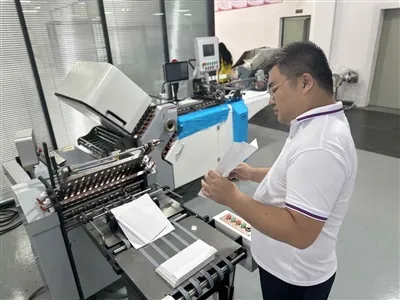
Strang is not clear or crooked faulty
Failure phenomenon: The creases after folding are not clear, blurred, or crooked, which affects the beauty and readability of the manual.
Cause analysis
The surface of the origami roller is worn or stained with dirt, causing insufficient friction with the paper.
The pressure of the origami roller is not enough to make the paper form a clear crease.
The paper shifts during the transmission process, causing the crooked crooked.
Solution
Clean the surface of the origami roller to remove dirt and impurities. If the wear is serious, replace the origami roller in time.
The pressure of the origami roller appropriately can be achieved by adjusting the position of the roller shaft or increasing the tension of the spring.
Check the paper transmission system, adjust the parallelity and verticality of the teleportation roller, and ensure that the paper transmission is stable and not biased. At the same time, check whether the paper entry device is normal, and avoid offset paper when entering the paper.
Device running noise abnormal failure
Failure phenomenon: The device makes abnormal noise during operation, such as harsh friction, impact sounds, etc.
Cause analysis
Mechanical components are worn, such as bearings, gears, chains, etc., resulting in unstable operation and noise.
The transmission parts are loose, such as screws, nuts, belts, etc., vibration occurs during the device runs to produce noise.
The inside of the device has a foreign body entering, colliding or friction with the parts to produce noise.
Solution
Regularly check and replace the wear mechanical parts such as bearing, gear, chain, etc.
The screws and nuts of the transmission parts are tightly adjusted to adjust the tension of the belt to ensure that the transmission parts are connected firmly and running smoothly.
Stop the inside of the device to remove foreign bodies. If the part is found to be damaged, it should be repaired or replaced in time.
Inaccurate counting
Failure phenomenon: The number of folding displayed by the device does not match the actual folding quantity.
Cause analysis
The counter sensor faults cannot be passed by accurately sensor paper.
The installation location of the sensor is improper, resulting in inaccurate sensing.
The equipment vibrates during the operation to loosen or displace the sensor, affecting the counting accuracy.
Solution
Check whether the meter sensor works normally. If there is a fault, replace the sensor in time.
Adjust the installation location of the sensor to ensure that it can accurately sensor the pass. Generally, the sensor should be installed in the appropriate position of the paper transmission path, and the distance between the paper should be moderate.
Check the fixed device of the device, fix the loose components, reduce the vibration of the equipment, and prevent the sensor from loosening or shifting.
Paper transmission fails smoothly
Failure phenomenon: Paper is paused, slipped or uneven during transmission.
Cause analysis
The surface of the transmitting roller is worn or stained with oil, causing the friction with the paper to decrease.
The pressure of the transmission roller cannot be effectively driven by paper transmission.
The transmission chain or belt of the device is loose and slippery, affecting the transmission efficiency.
Solution
Clean or replace the transfer roller to remove the oil and impurities on the surface. If the wear is severely, replace it in time.
Adjust the pressure of the transmission roller, increase the friction with the paper, and ensure that the paper transmission is smooth.
Check the tension of the transmission chain or belt. If there is a looseness, adjust the tightness or replace the chain and belt in time.